
To find an oil in the eoASSIST catalogue, copy its full name from the bottle, choose the catalogue language and check the entry you open. A search can return several products related to one word. The examples below use Lavender and Peppermint. We checked these steps in the web version on 11 November 2026.
Prepare the name and open search
Open the English oil catalogue. Click the search field at the top of the page. Enter the name in the search panel and wait for results. During our check, the panel displayed Loading while results were being fetched.
Start with the product name. Keep any additional words on the label for comparison after searching. A familiar word such as "mint" can relate to several entries. Do not choose a result just because its bottle picture looks similar.
The eoASSIST oil reference
Search for oils by name and open their reference entries.

Example one is Lavender
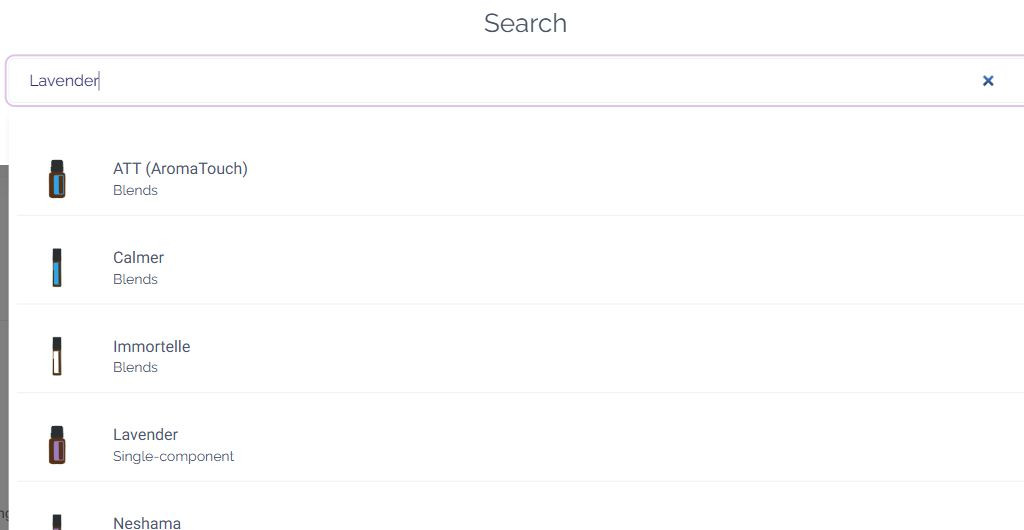
Searching for "Lavender" in the English interface returned several entries, including blends and a single-component entry named Lavender. Open the entry with that exact name if it is the one you want to explore. Then check the name again on the entry page.
The cover image shows part of this search result. Lavender appears alongside other entries. A result related to the search word is not necessarily the same product as the name on your bottle.
Example two is Peppermint
Searching for "Peppermint" also returned several entries. They included Japanese Peppermint, blends and an entry named Peppermint. Choose the full name you mean, rather than the first mint-related result. We opened the Peppermint entry and checked its name after navigation.
Use the product-type label as another way to read the results. Single-component, Blends and Supplements are different catalogue categories. A shared search word does not make their contents or intended use identical.
Keep the two checked routes handy
This table records the two English searches we tested. It is a worked example, rather than a dictionary of every oil name.
| Example name | Checked English query | Entry to open |
|---|---|---|
| Lavender | Lavender | Lavender |
| Peppermint | Peppermint | Peppermint |
What to check when a search is empty or ambiguous
Check spelling and the current page language. Our Russian-interface query "лаванда" found Lavender, while "Lavender" on that same Russian page returned no result during the check. The English catalogue found Lavender. This is an observation about specific queries, rather than a universal rule for every language or version.
If several entries appear, compare the complete name and product category. Open the candidate entry and check its name again. An empty search alone does not establish that the catalogue lacks an entry.
A reference entry helps you explore a name. It does not certify your particular bottle's ingredients, origin or quality. If its label lists a ready-made blend with a carrier oil, a matching word in the name of a single oil does not make the products identical. Use the five label checks for the packaging and ask the manufacturer or seller about missing details.
This walkthrough tests name search and opening entries in a browser. It does not provide instructions for using an oil or repeat medical recommendations from existing catalogue entries.
Source and check date
Our own Chrome walkthrough of public eoASSIST pages on 11 November 2026 covered the English and Russian catalogues, the queries "Lavender", "Peppermint", "лаванда" and "мята", and opening Lavender and Peppermint entries. We did not test the native mobile app in this walkthrough. The screenshot shows the web interface at the time of the check. Results can change.
The eoASSIST oil reference
Search for oils by name and open their reference entries.