
Compare essential-oil reference apps by asking each one to do the same jobs: find an oil from a label, open the right entry and show where its information comes from. That tells you more about everyday usefulness than a long feature list. This guide is written by the eoASSIST team. We use general selection criteria and a checked example from our own catalogue.
Start with two names you recognise
Use names from actual packaging or two familiar examples, such as Lavender and Peppermint. Check whether you can find the intended entry, distinguish similar names and return to the catalogue. Test the languages and spellings you expect to use.
Record what happened in a specific task. "Found Lavender and opened its entry" is more useful for comparison than "search feels good". If a search is empty, check the spelling and try the current interface's language. A single empty query does not establish that the catalogue has no such entry.
The eoASSIST oil reference
Search for oils by name and open their reference entries.

Check the information and its sources
An entry's name should help identify what you opened: a single oil, a blend or another category. A matching name does not establish what is in your particular bottle. Use its packaging and the manufacturer's information to check that product.
Look for a source explanation and a way to check an individual statement. A general bibliography and a citation for a particular claim provide different levels of detail. eoASSIST has a separate list of literature used. Read it alongside the material you want to check, rather than treating the list as proof of every possible claim.
For a health question, convenient search does not replace evidence checking or medical advice. The eoASSIST Google Play description states that the product is informational.
Use the same comparison checklist
Copy these questions into a note and record what happens for each app. You do not need a universal score. Focus on the actions you expect to repeat.
| What to check | How to check it |
|---|---|
| Name search | Enter two known names and open the intended entries |
| Similar results | Compare the full name and product type |
| Your language | Check entry text and search, as well as button labels |
| Sources | Find the source explanation and investigate a statement that matters to you |
| Returning to an entry | Check how to open a useful entry again |
| Access terms | Compare the store's purchase information with the functions available |
| Offline use | Test it separately if your situation requires it |
| Support and data | Find developer contacts and the privacy policy |
What we checked in eoASSIST
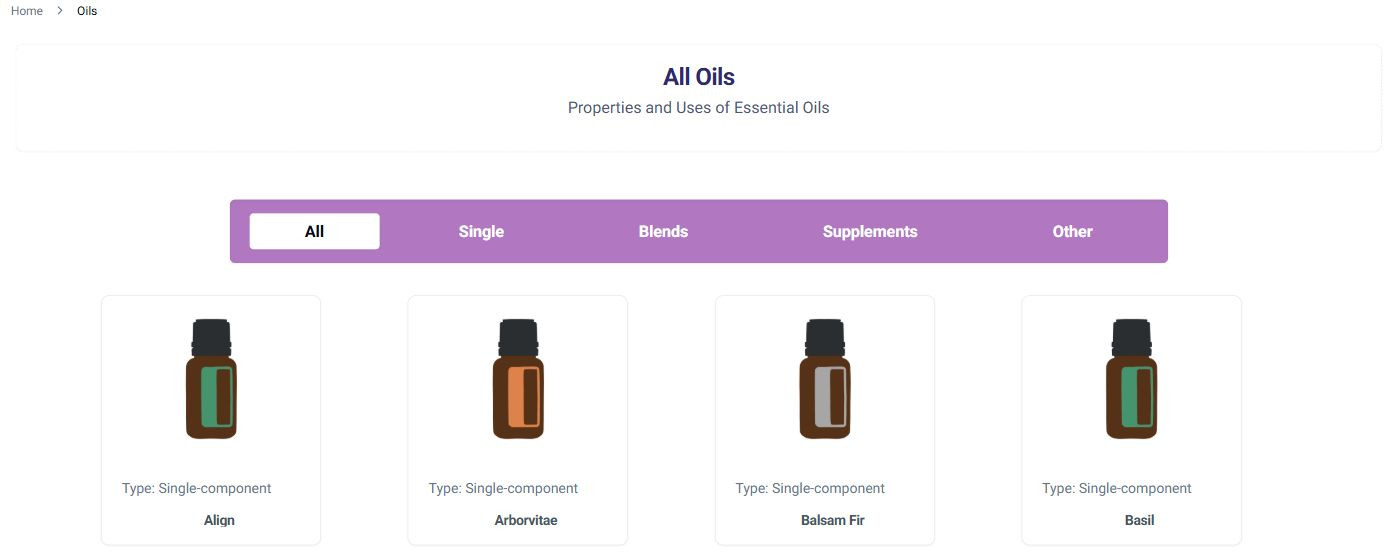
On 11 November 2026, we opened the English catalogue and the Russian catalogue in Chrome. The web version provides oil categories and links to individual entries. This article's cover shows the web catalogue, rather than an installed mobile app.
The check also showed why language testing matters. The Russian query "лаванда" found Lavender, while "Lavender" in that same Russian interface returned no result during our check. English search found Lavender among several results. These are observations of specific web queries, rather than a promise of identical behaviour on every device.
We also opened eoASSIST's Google Play and App Store listings. Both identify Cimmetria as the developer and indicate in-app purchases. Check the current store listing for the features and requirements relevant to your device. We did not test an installed app, offline operation or purchase restoration in this check.
Choose the next step for your task
If you want to explore a name on packaging, start with the catalogue and the full product name. To assess an app, repeat the same two searches after installation and test the functions you need. For the packaging itself, use the essential-oil label guide.
Sources and method
- Our own Chrome check of the public eoASSIST web catalogue on 11 November 2026: two name searches, categories and entry opening. Results can change.
- eoASSIST on Google Play and eoASSIST on the App Store. Name, developer and in-app-purchase label checked.
- eoASSIST bibliography. We checked that the expandable list exists. We did not reassess all the listed books.
The eoASSIST oil reference
Search for oils by name and open their reference entries.